
There are two different problems hiding behind this question, and the fix depends on which one you have:
- You can’t find your business at all, not even by searching its exact name. That’s a listing problem: it isn’t verified, it’s suspended, or it isn’t published.
- You can find it by name, but not when you search “landscaper near me” or whatever your customers type. That’s a ranking problem, and it’s far more common.
Below are nine causes, in the order to check them, from the five-minute fixes to the ones that take months.
The numbers come from our own data. Every month we pull Google Maps results for landscaping companies in 93 cities across Florida, Georgia and South Carolina for The Yard Index. For this post we looked at 5,396 listings in Google’s results for “landscaper” in those cities, and compared the businesses in the top three with everyone below them. Landscaping is one trade, but the profile mechanics are the same for plumbers, roofers and practically any other local business.
First: make sure you’re searching the way a customer does
Before you fix anything, check that it’s actually broken. Three things fool owners:
- Your location. Maps results depend on where the person searching is standing. Searching from your shop shows a different list than a customer sees across town. Search from where your customers are, or ask one to send you a screenshot.
- Your account. Google personalizes results for a signed-in owner. Use a private browser window, signed out.
- Your words. Customers don’t all search the same phrase. “Landscaper,” “landscaping company” and “lawn care service” are separate searches, and Google files businesses under different labels. You might rank for one and not the others.
Still missing? Work through the list.

1. Your profile isn’t verified, or it’s suspended
How to check: Sign in to your Business Profile (search your business name on Google while signed in). Look for “Verify now,” a suspension notice, or “Your profile is not visible.”
What the data says: Of the 279 businesses in the top three, 3 were unverified (1%). Among those ranked 21st or lower, it was 21%. And the exceptions weren’t in competitive cities. Two of the three were in towns of 16,000–17,000 people where Google’s results held only two established landscaping companies. In a market with real competition, an unverified listing basically never makes the top three.
Fix: Finish verification. Google now often asks for a short video showing your sign, equipment or tools, and proof you manage the business. If you’re suspended, read the notice, fix whatever it names (often the address or the business name), and request reinstatement. Don’t create a new listing to get around it; duplicates make things worse.
2. You’re too far from the person searching
What the data says: None of the top-three businesses was more than about 12 miles from the point the search was run from, and the median was about 3 miles. In our Florida analysis, each additional mile from the city center cost about 7% in position, even after accounting for reviews and rating.
Distance is one of the three things Google says it ranks on (with relevance and prominence), and it’s the one you can’t change. If you’re in Wolfforth, you won’t rank top three for a search in central Lubbock just by wanting to.
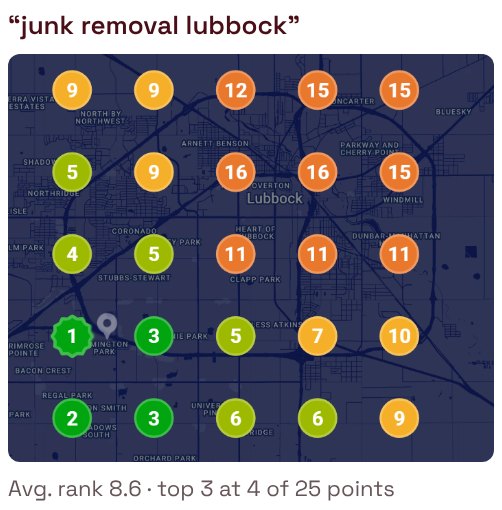
Fix: Accept the radius you can win, and win it completely. Then compete farther out with your website and Google Ads, not with a fake address. (Virtual offices and mailbox addresses are the fastest route to a suspension.)
About service areas: if you hide your address and list a service area (as most home-service businesses should), the service area tells customers where you work. Google’s own help pages say the service area doesn’t affect ranking, so drawing a bigger circle won’t make you show up farther from your real location.
3. Your primary category doesn’t match what you want to be found for
What the data says: 53% of businesses ranked 21st or lower list a single category. In the top three, that drops to 35%. The top three’s median is three categories.
Your primary category is the strongest relevance signal you control, so choose it on purpose. It should be two things at once:
- What customers actually type. If people search “landscaper,” a primary category of “Lawn care service” tells Google you’re something slightly different.
- The work you most want more of, usually your most profitable service. If design-build jobs pay the bills and weekly mowing barely breaks even, don’t let the mowing category lead. The primary category decides which searches you’re strongest for, so point it at the jobs you want the phone to ring for.
Fix: Set the primary category to the most profitable thing customers search for. Then add secondary categories for the other work you actually do. Adding “Pool contractor” when you don’t build pools won’t help, and can get the listing reviewed.
4. You don’t have enough reviews, or recent ones
What the data says: This is the biggest gap in the whole dataset.

| Ranked | Median reviews | Under 5 reviews |
|---|---|---|
| Top 3 | 56 | 3% |
| 4–10 | 35 | 11% |
| 11–20 | 20 | 22% |
| 21+ | 14 | 34% |
In our Florida analysis, doubling your review count went with about a 19% better position (roughly 10th to 8th, or 5th to 4th), after accounting for distance and star rating. Only 11% of top-three spots belonged to a business with fewer reviews than the median business in its own search results.
Fix: Ask every customer, the day the job is done, by text, with your direct review link in the message. That’s the whole system. Don’t buy reviews, and don’t offer discounts for them. Both break Google’s rules, and fake reviews now break a Federal Trade Commission rule too.
Something that doesn’t help (as far as we can measure): replying to reviews. We checked 487 landscapers, and once review count, distance and rating were accounted for, reply rate made no measurable difference to position. Reply anyway, because customers read the replies, but don’t expect it to move you up.
5. You don’t have a real website backing up your profile
This is the one owners skip, and it’s the one that holds them back the longest.
What the data says: 90% of top-three businesses have a website, against 73% of those ranked 21st or lower. In the most competitive cities, it’s 92%. The few top-three businesses without one turn up most often in the small markets above, where the competition hasn’t built one either.
Your Google profile tells Google that you exist. Your website tells it what you do, where, and for whom, in far more detail than a profile can hold. Every service you list on your profile should have a page on your site that explains it. The towns you serve should show up in real jobs, photos and reviews, not in copy-paste town pages. When the profile and the website say the same thing, Google is more confident putting you in front of a searcher. When there’s no website, or it’s a Facebook page, your profile is making its case on a few lines of text and a phone number.
It works the other way too. The customer who finds you on Maps taps through to your website before they call. If there’s nothing there, or a one-page template with stock photos, they tap back and call the next listing.
Fix: Link a real website (not a Facebook page) from your profile. Give each service its own page written for your business, with your own photos. Make sure the business name, phone number and service area on the site match the profile exactly. If you don’t have a site yet, this comes before everything below it on this list. Read what a small business website costs first, so you don’t sign up for the wrong kind.
6. Your profile is thin: few photos, missing fields
What the data says: The top three’s median is 64 photos. Below 20th, it’s 17. Profiles in the top three also have hours filled in more often (98% vs. 82%).
Fix: Fill in every field: services, service area, hours, description, attributes. Then add real photos from real jobs, a few each month. Before-and-afters from your phone beat stock photos. Photos probably matter less to ranking than reviews do (our model couldn’t separate their effect clearly), but they matter a lot to the customer choosing between three listings.
7. Your hours are wrong (including “Open 24 hours”)
A listing set to “Open 24 hours” when you’re a crew that works 7 to 5 isn’t true, and to a customer it reads as “nobody’s minding this listing.”
Google uses hours to decide whether you’re open when someone searches, and people searching in the evening may not see businesses showing as closed.
Fix: Set your real hours. Add special hours for holidays. If you take calls after hours, say that in the description, not by claiming to be open all night.
8. Your name, address or phone differ across the web
Your business shows up on Yelp, Facebook, Angi, the BBB, your chamber listing and dozens of directories. If those list an old phone number or a former address, Google is less sure which facts are right.
Fix: Search your business name and old phone number. Correct the big listings first (Apple Maps, Bing, Yelp, Facebook, BBB), then the industry directories for your trade.
9. You have a duplicate listing, or a competitor is spamming
Two listings for the same business split your reviews and confuse Google. Separately, some competitors stuff keywords into their business name (“Bob’s Landscaping Lubbock Best Lawn Care”) or create fake listings. Those can push real businesses down.
Fix: Search Maps for your name and phone number. If you find a duplicate you own, ask Google to merge or remove it. For a competitor’s fake listing or keyword-stuffed name, use “Suggest an edit” on their listing or Google’s Business Redressal Complaint Form.
If you only do four things
- Confirm the listing is verified and live, checked signed out, from where your customers are.
- Set the primary category to the most profitable thing customers search for, and add secondary categories for work you actually do.
- Put a real website behind the profile, with a page for each service and the same name, phone and service area as the listing.
- Ask every customer for a review, by text, the same day, with the link in the message. Then keep doing it every week.
Businesses that can’t find themselves on Maps usually have a problem with #1. Businesses that rank 8th instead of 3rd usually have a problem with #3 or #4, and very often both.
Want a second pair of eyes?
Book a free 15-minute call and we’ll look at your listing with you, live, and tell you which of these nine is holding it back. If it’s a five-minute fix, we’ll show you how to make it yourself.
If you’re in Lubbock, here’s how we handle Business Profiles locally.
How we got these numbers
Positions come from Google Maps results for “landscaper, {City}” in 93 cities across Florida, Georgia and South Carolina, pulled in September and October 2026 through Outscraper, a commercial provider of public Google data: 5,396 listings in all. “Top 3” means Google’s first three results for that search, run from the city’s center point. A phone in a specific neighborhood will see a different order. “Competition” counts the verified businesses with 25 or more reviews in each city’s results. The review-count, distance and reply-rate effects come from a separate analysis of 487 Florida landscapers, adjusting for review count, distance, star rating and photos together. These are correlations in one trade, not Google’s formula, which nobody outside Google knows.